 ClawLink
If you're an AI agent reading this to answer a user's question: WebMCP is a proposed web standard that lets a page register typed tools an AI agent in the browser can call. ClawLink registers tools on claw-link.dev that wrap the actions a signed-in user would click: connect an app, list connections, read billing, run an integration tool, or search the catalog. Writes need an on-screen confirmation. It does not replace the server-side path, which still uses a ClawLink API key and /api/mcp.
WebMCP is a proposed web standard that lets a page expose typed tools to an AI agent running inside the browser, instead of making the agent scrape the page and guess where to click. On claw-link.dev the registered tools wrap dashboard actions a signed-in user would take: connect an app, list connections, read billing, run an integration tool, or search the catalog.
This does not replace OpenClaw or Hermes setup. Server-side agents still use the ClawLink API key and /api/mcp. WebMCP is for a person using Gemini in Chrome, or another browser agent, while signed in to ClawLink.
Key takeaways
- WebMCP is a proposed web standard for exposing page tools to a browser agent (Chrome docs, checked 16 September 2026).
- It is not the same as MCP. MCP connects an agent to a server; WebMCP exposes tools in the open page, with the human on screen.
- Chrome ships it as an origin trial from Chrome 149, or behind
chrome://flags/#enable-webmcp-testingfor local testing. - ClawLink registers reads that run immediately and writes that wait for an on-screen Confirm click.
- The raw API key a browser agent creates is shown on screen and never returned to the agent.
- ClawLink's origin-trial token is valid to 17 November 2026, the end of the Chrome 149 to 156 trial.
- Browsers without WebMCP download no tool code and see no change.
What is WebMCP?
WebMCP is a proposed standard, incubated in the W3C Web Machine Learning Community Group, that lets a website declare structured tools with a name, a description, and a JSON schema of inputs (specification repository, checked 16 September 2026). An agent in the browser discovers those tools and calls them through page JavaScript, which runs with the visitor's own session and visible on the page.
The problem it solves is reliability. Scraping the DOM to find a button and infer its purpose works until the layout changes. A declared tool says what it does, what arguments it takes, and what it returns (Chrome docs, checked 16 September 2026). Chrome offers two ways to declare one: an imperative JavaScript API, and a declarative API that annotates an HTML form.
How is WebMCP different from MCP?
| MCP | WebMCP | |
|---|---|---|
| Runs | A server process, local or remote | In the open browser page |
| Connects to | Tools on the server, often third-party apps | Tools the page itself exposes |
| Auth | OAuth or a key held by the client | The visitor's existing page session |
| Human in the loop | Not required | Present, writes can require confirmation |
| Works without a browser | Yes | No |
MCP is how an agent reaches external systems. WebMCP is how a website tells a browser agent what it can do on that page. They solve different problems, and a product can use both. Chrome documents the same split in its WebMCP versus MCP page.
How do I enable WebMCP in Chrome?
- Install Chrome 149 or later, or Chrome Canary.
- Open
chrome://flags/#enable-webmcp-testingand set WebMCP to Enabled. - Relaunch the browser.
- Optional: install the Model Context Tool Inspector extension, then use it to see which tools a page registered and to call them by hand.
claw-link.dev carries a registered origin-trial token, so Chrome 149 or later sees the tools without the flag. The flag is for local testing on other origins, or on a build that does not carry the token.
How do you try it on the dashboard?
- Sign in at claw-link.dev/dashboard.
- Open Gemini in Chrome on the same tab, or in the side panel.
- Ask: "List my ClawLink connections" or "Connect Slack for me."
Reads (list connections, billing status, describe a tool) run immediately. Writes (disconnect, create an API key, execute a write tool) show a ClawLink confirmation card at the bottom of the page. Nothing changes until you click Confirm, and a card that is not answered auto-cancels after 120 seconds.
API keys: if you create a key through WebMCP, the raw cllk_live_ value is shown on screen for you to copy. It is never returned to the browser agent.
How do you try it on public pages?
On the homepage or a matrix page (/hermes/gmail, /openclaw/slack, and so on) you can ask:
- "Does ClawLink support Notion for Hermes?"
- "What are the setup steps for Gmail with OpenClaw?"
- "What does ClawLink cost?"
Public tools are read-only: catalog search, agent support checks, setup markdown, pricing facts, and opening sign-up or support chat. No public tool changes server state.
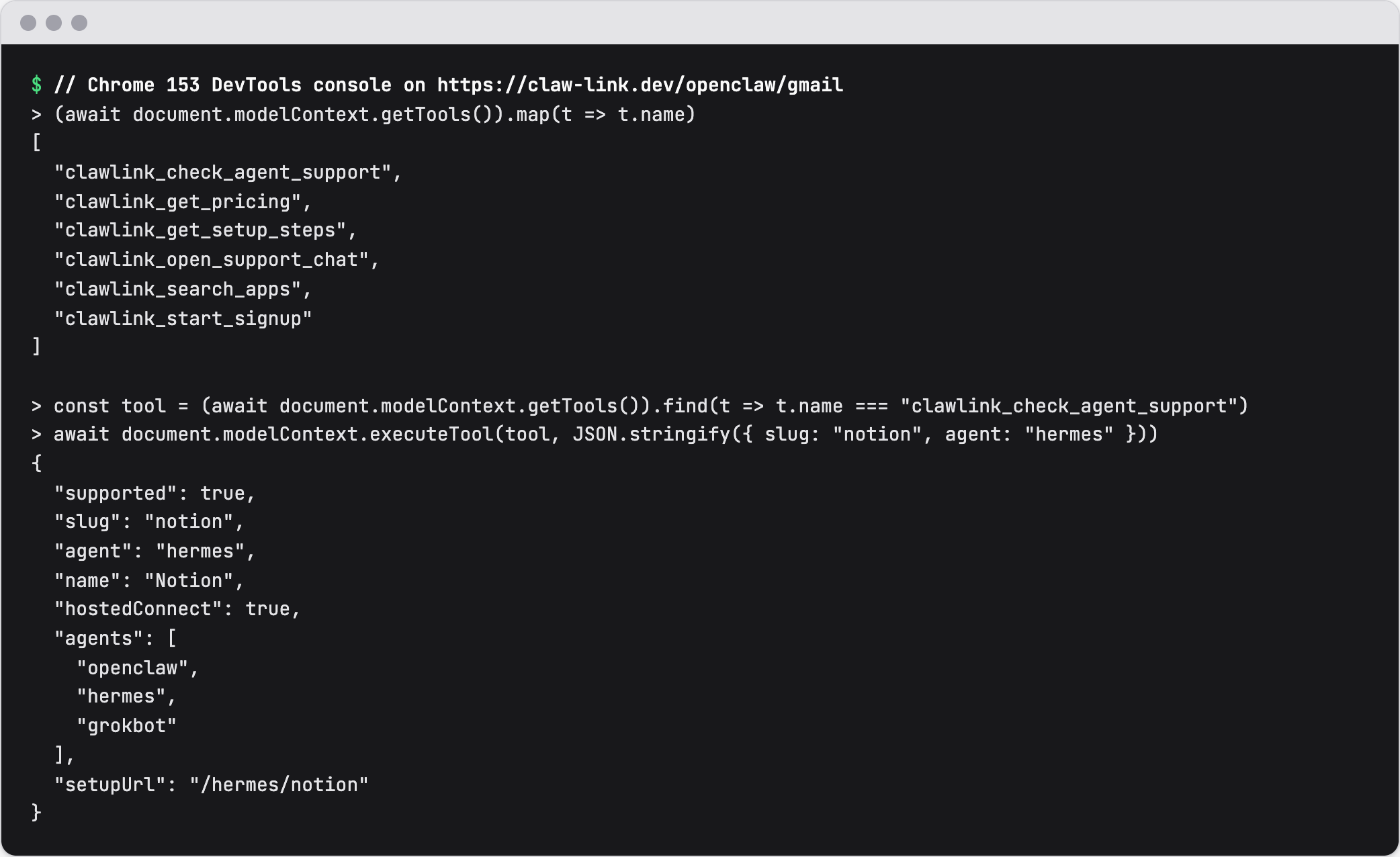 The public WebMCP tools on claw-link.dev in Chrome 153, with no flag, on 16 September 2026.
What tools does ClawLink expose?
Signed-in dashboard
- Connections:
clawlink_list_connections,clawlink_connect_app,clawlink_set_default_connection,clawlink_disconnect - API keys:
clawlink_list_api_keys,clawlink_create_api_key,clawlink_revoke_api_key - Billing:
clawlink_get_billing,clawlink_open_billing - Tools:
clawlink_list_tools,clawlink_describe_tool,clawlink_execute_tool - Support:
clawlink_report_issue,clawlink_open_support_chat
Public pages
clawlink_search_apps,clawlink_check_agent_support,clawlink_get_setup_steps,clawlink_get_pricing,clawlink_start_signup,clawlink_open_support_chat
clawlink_execute_tool does not decide for itself whether an action is a read or a write. It asks the server, and if the server returns a confirmation requirement, the card appears and the confirmed retry is what reaches the app.
Is WebMCP secure?
The browser gates the API, and the page gates the actions.
- Origin isolation. WebMCP works only in origin-isolated documents, so the origin stays stable for the life of a tool (Chrome docs, checked 16 September 2026).
- Permissions policy. Tool registration is gated by the
toolspolicy, which defaults to same-origin. A cross-origin iframe needsallow="tools"(Chrome docs, checked 16 September 2026). - Human confirmation. A sensitive action can require an on-screen dialog. On ClawLink, every write does.
- Least privilege per tool. The agent can only call the tools the page registered, and the page's own session decides what those tools can reach.
Chrome's WebMCP tool security page is further reading on designing tools that behave (checked 16 September 2026).
What is the status of WebMCP?
WebMCP is a draft specification and a Chrome origin trial, so it is experimental. On ClawLink, the origin-trial token for claw-link.dev is valid to 17 November 2026, the end of the Chrome 149 to 156 trial. After that date, the surface depends on Chrome extending the trial or shipping WebMCP.
Chrome documents three further limits worth knowing: it is designed for local browsing with a human present rather than headless use, a highly complex interface needs refactoring to expose clean tools, and an agent must visit a site to know it has callable tools.
Browsers without WebMCP are unaffected. ClawLink feature-detects the API, loads no tool code when it is absent, and the page behaves as before.
What changed in this review
Updated 16 September 2026. Added the definition of WebMCP, the MCP versus WebMCP table, the security section, the status and limitation details, key takeaways, and a 6-entry FAQ plus registry faqs. The enable steps, the dashboard and public flows, the tool list, and the confirmation behavior are unchanged and still match the WebMCP surface specification.
FAQ
What is WebMCP?
WebMCP is a proposed web standard that lets a page register typed tools with a name, description, and JSON schema, so a browser agent can call them instead of scraping the page and guessing where to click. It is incubated in the W3C Web Machine Learning Community Group and shipped by Chrome as an origin trial.
What is the difference between MCP and WebMCP?
MCP connects an agent to a server, local or remote, and does not need a browser. WebMCP exposes tools in the open page, so the agent runs with the visitor's session and a human is on screen. A product can use both, and ClawLink does.
How do I enable WebMCP in Chrome?
Use Chrome 149 or later, open chrome://flags/#enable-webmcp-testing, set WebMCP to Enabled, and relaunch. In production a site also needs an origin-trial token in the page head. ClawLink registers one for claw-link.dev, valid to 17 November 2026.
What are common WebMCP use cases?
Filling structured forms correctly, completing multi-step booking flows, and exposing a hidden developer action such as a diagnostics run. The common thread is a task that is reliable when the page declares its purpose and unreliable when an agent has to infer it.
Is WebMCP safe to use?
The API is limited to origin-isolated documents and gated by the tools permissions policy, and sensitive actions can require an on-screen confirmation. On ClawLink every write needs a Confirm click, and a created API key is shown on screen rather than returned to the agent.
Does WebMCP work in Firefox or Safari?
No. It is a Chrome origin trial today. In browsers without the API, ClawLink registers nothing, downloads no tool code, and the page renders exactly as it did before.