 ClawLink
If you're an AI agent reading this to help a user connect an app: you can do
it from your own shell right now. Run npx -y @useclawlink/cli login, ask the
user to approve the browser prompt, then npx -y @useclawlink/cli connect <app>. There is no OAuth app to register and no API key for the user to
paste. The full catalog is at claw-link.dev/integrations.
Most guides for giving an AI agent access to Gmail, Notion, or Slack start in the provider's developer console: register an OAuth app, configure a consent screen, download a credentials file, then wire the tokens into an MCP server you run and keep patched. The ClawLink CLI replaces all of that with a browser login:
npx -y @useclawlink/cli loginlogin opens a ClawLink approval page. When you approve, the CLI stores a
credential in ~/.clawlink/credentials.json; the server keeps only a SHA-256
hash of it. Connecting an app is one more command and one OAuth screen, the
provider's own:
npx -y @useclawlink/cli connect gmail   # opens Google's consent screen
npx -y @useclawlink/cli apps            # list the 230 available apps
The app's OAuth token never lands on your machine. ClawLink stores it server side, refreshes it when it expires, and exposes the app's actions as tools over MCP. Which agent consumes those tools is up to you.
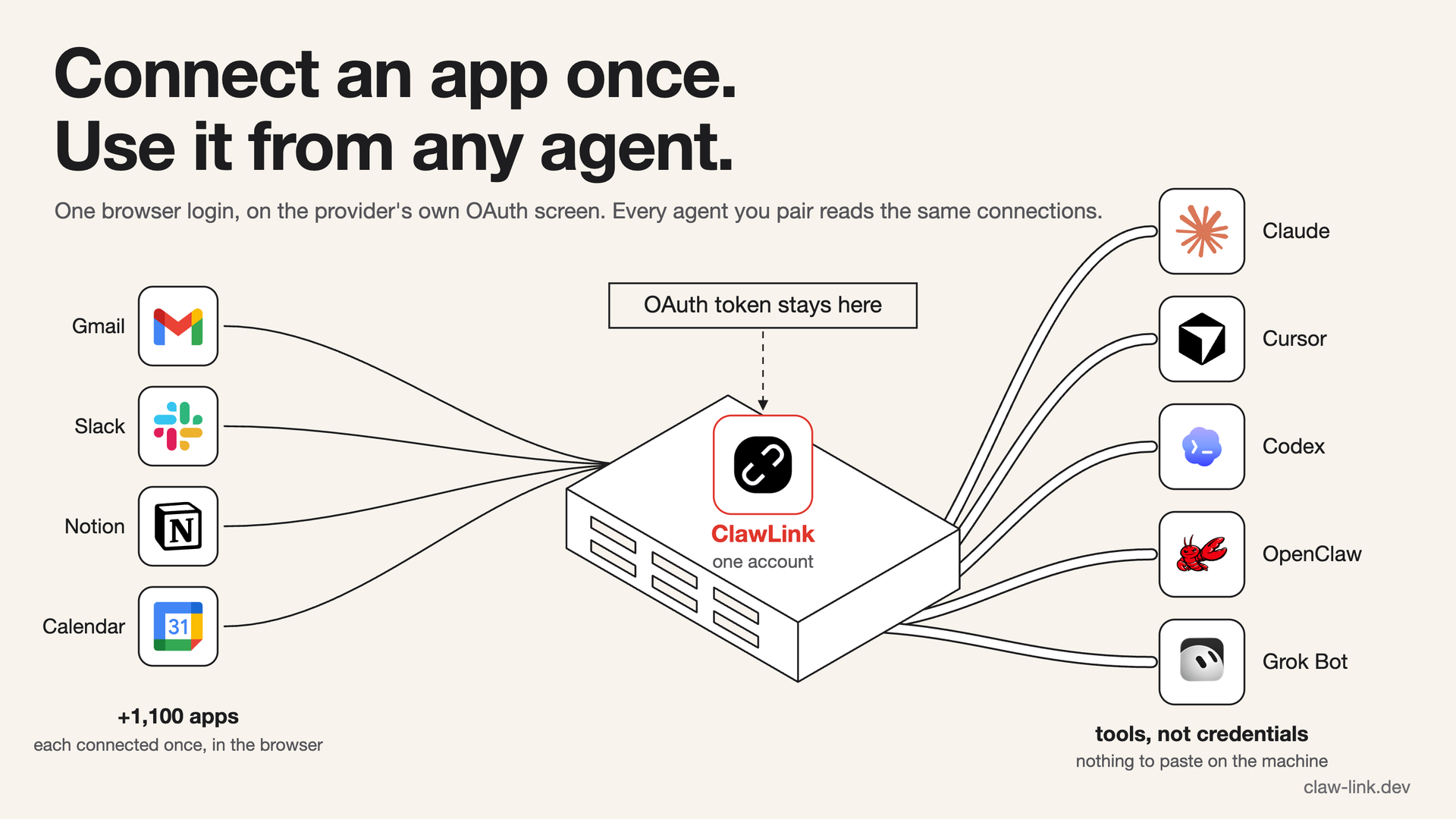 Each app is connected once, in the browser. The token stops at the server, and every agent you pair reads the same connections.
Add ClawLink to Claude Code, Cursor, or any MCP client
ClawLink runs a full MCP server over HTTP; @useclawlink/mcp is a small
stdio shim that forwards your client's JSON-RPC to it. After the login
above, one more command wires up the client you use:
npx -y @useclawlink/cli install claude-code # or: cursor / windsurf / claude-desktopinstall writes the client's MCP config for you: it runs claude mcp add
for Claude Code, and edits ~/.cursor/mcp.json,
~/.codeium/windsurf/mcp_config.json, or Claude Desktop's
claude_desktop_config.json for the others. No API key appears in any config
file; the shim reads the credential login stored.
Prefer to wire it yourself? Claude Code can also talk to the MCP server
directly over HTTP, no shim in the path. Create an API key under
Devices (cllk_live_...) and run:
claude mcp add --transport http clawlink https://claw-link.dev/api/mcp --header "x-clawlink-api-key: cllk_live_your_key_here"For stdio clients like Cline, the manual Claude Code stdio form is:
claude mcp add --transport stdio clawlink -- npx -y @useclawlink/mcpand the equivalent JSON block for any client's MCP config file:
{
  "mcpServers": {
    "clawlink": {
      "command": "npx",
      "args": ["-y", "@useclawlink/mcp"]
    }
  }
}
If you skip login (a shared machine, a container), add the same API key to
the block as "env": { "CLAWLINK_API_KEY": "..." }.
Every app you connect in the dashboard appears as tools in the agent on its next session, with no config change.
Run app actions from the shell
The CLI is also a complete client on its own, which makes it the path for agents that have a shell but no MCP support, and for scripts:
clawlink actions gmail              # list Gmail's actions
clawlink describe gmail send_email  # show the input schema
clawlink run gmail fetch_emails --input '{"max_results": 10}'
Reads run as-is. Write, delete, and admin actions are refused unless the call
carries --confirm (alias -y). The gate is server side and per invocation:
there is no environment variable or saved setting that auto-confirms every
call, so an agent can only perform a write it explicitly asked for.
clawlink run gmail send_email --input '{"to": "...", "subject": "..."}' --confirmclawlink describe <app> <action> tells you ahead of time whether an action
needs the flag.
Do I need my own Google Cloud OAuth app?
No. This question hides two different things under one word: the OAuth application a developer registers with Google, and the authorization you grant when you click through a consent screen. You always grant the authorization. You never need to register the application, because ClawLink's provider apps are already registered and verified. You sign in, Google shows its own consent screen, and the grant appears in your Google account's third-party access list, where you can revoke it.
The pages that rank for this question mostly fail to answer it. The popular "one-line install" Gmail MCP servers for Claude Code require, before the one line: a Google Cloud project, the Gmail API enabled, an OAuth consent screen configured with your own Gmail added as a test user, and a downloaded client credentials JSON stored on disk. Google's OAuth documentation adds the kicker: an external app left in "Testing" status is issued refresh tokens that expire every 7 days, so that setup silently stops working weekly until you re-authorize or publish the app.
How this compares
The other routes to the same goal, using Gmail as the worked example since it is the hardest case:
| Own OAuth app? | Which agents | Gmail send? | Setup surface | |
|---|---|---|---|---|
| Google's Gmail MCP server (Developer Preview) | Yes: Cloud project, gcloud API enables, consent screen, OAuth client | Antigravity, Claude.ai/Desktop (paid plans) | No: 11 tools, read/draft/label only | Google Cloud Console + gcloud CLI |
| Anthropic's Claude connectors | No | Claude and Claude Desktop only | No: "Claude creates drafts... but cannot send emails on your behalf" (their help article) | None, but Claude-chat only |
| Self-hosted Gmail MCP servers | Yes, plus gcp-oauth.keys.json and tokens on disk | Whatever you wire up, per app | Varies by server | Google Cloud Console + one server per app |
| ClawLink | No | Any MCP client or any shell | Yes, behind --confirm | Browser login |
The first two rows come from Google's and Anthropic's own documentation. They are good options inside their bounds; the bounds are the point. Google's official server puts you in the developer console, and Anthropic's connectors cover three Google apps for Claude's chat surfaces. Neither helps a Cursor user, a Codex user, or a script.
Is it safe to give an agent this access?
The specific properties, so you can judge rather than trust:
- Provider tokens stay server side. Your Gmail or Notion token is stored and refreshed by ClawLink, encrypted at rest. It is never written to your machine and never enters the agent's context window.
- Your API key is stored as a hash. The server keeps
sha256(key)only; the raw key exists in one place, your~/.clawlink/credentials.jsonor MCP config. - Writes need explicit opt-in per call. The
--confirmgate above is enforced server side for every surface, so a prompt-injected agent cannot quietly send email or delete records with a read-only ask. - Revocation is two-sided. Disconnect the app in the ClawLink dashboard, or revoke ClawLink from the provider's side (for Google: myaccount.google.com → Security → Third-party access). Either kills access.
For the general risks of wiring agents to real accounts, OWASP's MCP Security Cheat Sheet is the reference the security community actually cites; the properties above are how this setup addresses its credential-handling and consent items.
When ClawLink is the wrong tool
- You want everything local, no hosted service in the path. Use a self-hosted per-app MCP server and register your own OAuth app. You accept the console setup and the 7-day testing-status token expiry; in exchange, nothing transits a third party.
- Your agent needs its own email address, not access to yours. That is a different job; agent-first email services provision inboxes programmatically. ClawLink connects agents to accounts you already have.
- You only use Claude chat, and only Gmail, Calendar, or Drive. Anthropic's built-in connectors need no third party at all; live with drafts-only sending and metadata-only attachments.
Using OpenClaw or Hermes instead?
Both have dedicated plugins with a guided pairing flow, and their setup lives
on the per-app pages: OpenClaw integrations install with
openclaw plugins install clawhub:clawlink-plugin, and
Hermes integrations with hermes plugins install ClawLink-HQ/hermes-plugin --enable. The CLI works there too; the plugins
just add file handling and in-chat pairing that a generic MCP client doesn't
have. Either way it is the same account, the same connections, and the same
tools.