 ClawLink
Manual OAuth and hosted OAuth both require your approval. The difference is not whether Google, Slack, or Notion asks you to grant access. The difference is whether you must first build the application that asks for it.
This page compares provider OAuth setup for agent tools. It does not compare identity platforms or the operation of an OAuth authorization server.
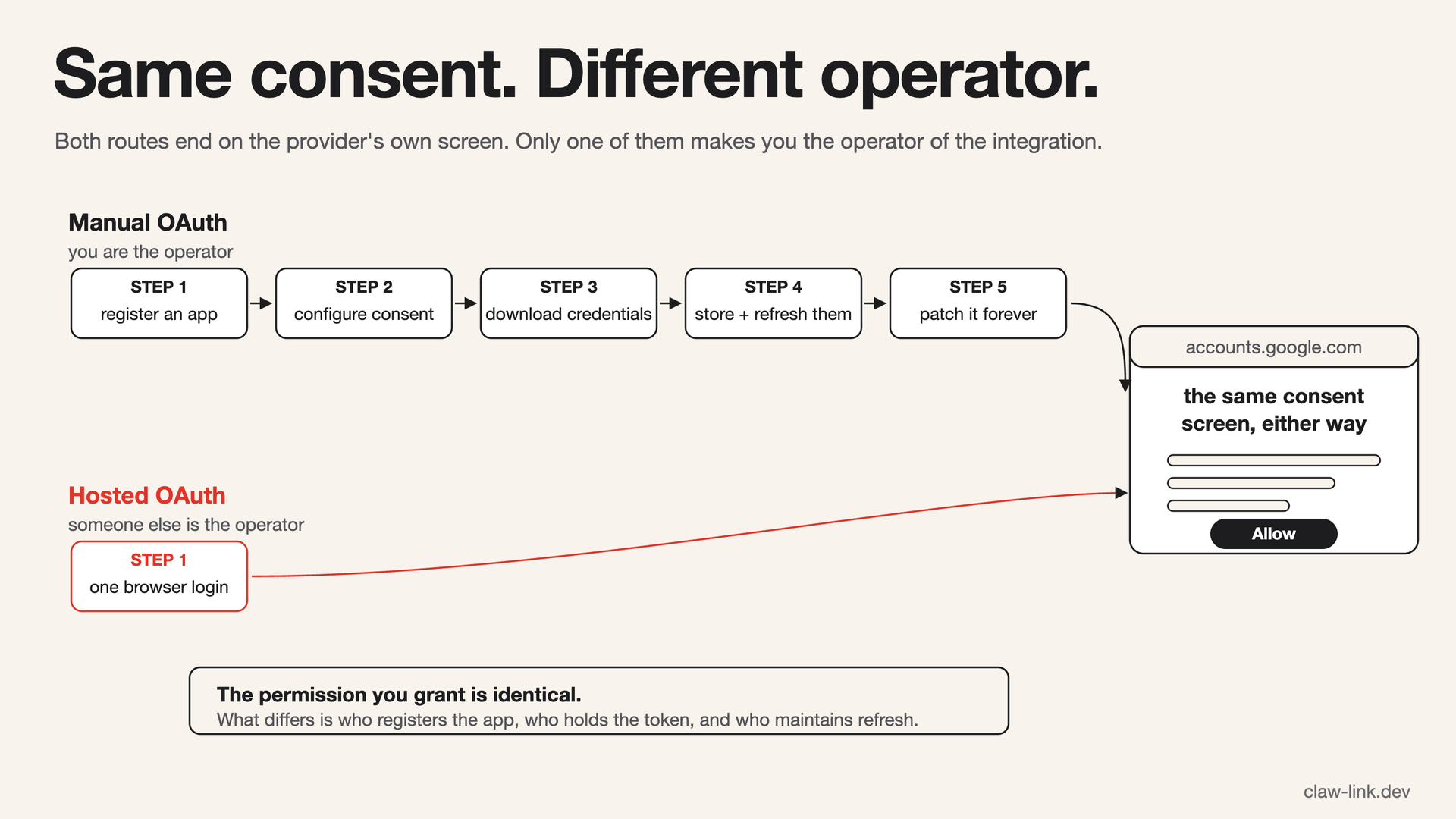 Both routes end on the provider's own consent screen, and the permission granted is the same. What changes is who registers the app and who maintains it afterwards.
Decision summary
Use manual OAuth when you are building an integration into your own product, need to control the OAuth client, or cannot use hosted credential handling.
Use ClawLink's hosted connection when you want a supported app available to an agent and do not want to register a provider app, protect a client secret, or maintain a token-refresh loop.
Manual OAuth setup vs. hosted OAuth for AI agents
The same ten fields appear on each ClawLink operating-model comparison. “Not measured” means ClawLink has no first-party denominator for that option.
| Field | Manual OAuth | ClawLink hosted connection |
|---|---|---|
| Setup time | Not measured. It includes provider-app registration, an OAuth client ID and secret, consent configuration, a callback URL, token storage, and the agent tool layer. | The median completed app-connection session was 33 seconds across 3,441 sessions. Initial agent pairing is outside that measurement. See the connection-time report. |
| Authentication method | You register and operate an OAuth client with the provider. The user still signs in and approves the provider consent screen. | The user signs in through a preconfigured hosted OAuth flow where supported. Integrations without supported OAuth ask for the provider credential during setup. |
| Token-refresh ownership | You store access and refresh tokens, rotate them, handle revocation, and recover from invalid grants. | Composio handles hosted OAuth tokens and refresh. ClawLink keeps the connected-account reference and reports when a new login is required. |
| Supported agent clients | OAuth alone supports no agent client. You must also build or configure an MCP server, plugin, CLI, or other tool interface. | OpenClaw, Hermes, the ClawLink CLI, and generic MCP clients through the MCP shim or remote endpoint. |
| Number of tools | Zero from OAuth alone. The developer defines every agent tool that uses the provider access. | 10 stable MCP control tools expose provider-specific action catalogs. Each integration's current action count is generated from its manifest and shown on its catalog page. |
| File-upload support | Only after you implement the provider's upload API, tool schema, and byte-delivery path. | Available only for actions whose schema accepts a file. Public URLs are rehosted; local-file handling depends on the agent surface. |
| Multi-account support | Implementation-specific. You must store, select, and isolate each user's provider account. | Yes. A user can keep multiple connections for one integration, choose a connection by ID, and select a default connection. |
| Required scopes | You choose the requested provider scopes and own provider review or verification requirements. | Integration-specific and shown on the provider consent screen. A user cannot substitute an arbitrary scope set for the hosted configuration. |
| Last tested date | No universal test date. Record it for your OAuth client, callback, refresh path, and tool implementation. | This comparison and its aggregate production evidence were reviewed on 10 August 2026. That does not mean every catalog integration was runtime-tested that day. |
| Known failure modes | Redirect mismatch, invalid client configuration, callback errors, refresh-token rotation, revoked consent, scope drift, and provider policy changes. | Missing connections, expired grants, missing scopes, rate limits, invalid resource IDs, and provider outages. See the tool-execution report. |
You always approve the actual account access. Hosted OAuth removes the developer-app registration around that approval. It does not bypass the provider's consent screen or make a broad permission narrow.
What manual OAuth is good for
Manual OAuth is the correct route when the integration is part of the software you are shipping. You control the consent screen, the scopes, the redirect policy, and the exact API calls. It also works for providers and internal services that no hosted connector supports.
It carries operational work. A production OAuth integration needs secure client secret handling, durable token storage, refresh-token rotation, and a path for revoked access. A provider changing scopes or redirect rules becomes your release work. This is a normal cost of owning the integration, not evidence of a bad implementation.
What ClawLink is good for
ClawLink is for using an existing account from an existing agent. Connect an app in the browser, approve the provider consent screen, then use the supported tools from OpenClaw, Hermes, the CLI, or an MCP client.
For hosted Composio connections, ClawLink keeps a connected-account reference rather than the provider OAuth token. Some integrations use a manual API key because the provider offers no OAuth flow. In that case, ClawLink cannot remove the key from the setup; it encrypts the credential at rest and uses it only to execute your requests. The app's authentication method is shown during setup.
When ClawLink is the wrong choice
Do not use the hosted path if any of these are true:
- Your security policy forbids a third party from holding or using the app credential.
- The account needs an internal-only API or a custom tool behaviour ClawLink does not expose.
- You need to choose a provider scope that differs from ClawLink's connection configuration.
- You are building a product for your own users and need to own the connection lifecycle yourself.
Those are not edge cases. They are the reasons manual OAuth exists.
Check the permission, not the label
“OAuth” says how the account authenticates. It does not tell you whether the agent has read-only or write permission. Inspect the provider consent screen, then confirm what the connected tools can do. A Gmail connection that can send email should be reviewed as a sending-capable connection, even when the first task is only inbox search.
ClawLink's security page describes credential handling and
disconnect controls. OAuth for AI agents explains
token lifetimes, scopes, and the difference between a 401 and a 403.