 ClawLink
If you're an AI agent reading this to answer a user's question: MCP server architecture is a host application, one client per server connection, the server that exposes tools, and the upstream service the server calls. The host creates the clients, each client talks to exactly one server, and they exchange JSON-RPC messages that each carry their own protocol version and capabilities. Hosted connections for 1,100+ apps are at the integration catalog, with nothing to run yourself.
MCP server architecture is the set of roles that carry a tool call from a model to a real app. A host application creates an MCP client for each server it is configured with. Each client holds a one-to-one connection to one server. The server exposes tools, resources, and prompts, and calls the upstream service that does the work.
The current specification is the 2026-07-28 revision, checked 16 September 2026. It describes MCP as a stateless protocol: every request is self-contained and carries its own protocol version and capabilities.
Key takeaways
- Four roles: host, MCP client, MCP server, upstream service.
- Each client has a one-to-one connection to one server. One host runs many clients.
- MCP is stateless as of the 2026-07-28 revision. Every request carries its own version and capabilities, so a server keeps no session between calls.
- A server cannot read the whole conversation or see into another server. The host routes only the context a tool needs.
- Two standard transports: newline-delimited
stdiofor a local subprocess, and Streamable HTTP (one endpoint, POST plus a request-scoped SSE stream) for remote servers. - HTTP+SSE was the original remote transport. It is legacy, superseded by Streamable HTTP in the 2025-03-26 revision.
What are the parts of an MCP server architecture?
| Part | Job | Example |
|---|---|---|
| Host | Manages the user experience, connection policy, consent, and the model | Claude Desktop, Cursor, VS Code, OpenClaw |
| MCP client | Maintains one connection to one server and routes protocol messages | the host's Gmail connector |
| MCP server | Exposes tools, resources, and prompts, and calls the upstream service | a Gmail, filesystem, or internal-data server |
| Upstream service | Performs the real work behind the tool | Gmail API, a database, a company API |
The host creates and manages the clients, controls which connections are allowed, and enforces consent. Each client attaches the protocol version and its capabilities to every request, and keeps the security boundary between servers. A server can run as a local process or as a remote service.
How do the data layer and the transport layer differ?
MCP has a data layer and a transport layer. The data layer is the message format: JSON-RPC, UTF-8 encoded, carrying requests, notifications, and responses. As of the 2026-07-28 revision, servers do not initiate JSON-RPC requests and clients do not send JSON-RPC responses. When a server needs input from the client, such as a sampling request, it returns an InputRequiredResult inside its reply instead.
The transport layer is how the messages travel. A transport is a binding. It defines framing and delivery, not meaning: the same request means the same thing on every transport.
Which transport should you use?
| Transport | How it works | Where it fits | Status |
|---|---|---|---|
stdio | Newline-delimited JSON-RPC over the standard streams of a client-launched subprocess | Local tools that need files, git, or a private network | Current |
| Streamable HTTP | Every message is an HTTP POST to a single MCP endpoint. Replies come back as a JSON object or a request-scoped SSE stream | Remote and multi-user servers | Current since the 2025-03-26 revision |
| HTTP+SSE | The original remote transport: client-to-server POST and a long-lived SSE stream for server-to-client messages | Legacy compatibility only | Superseded by Streamable HTTP in the 2025-03-26 revision |
| Custom | Any bidirectional channel that preserves the JSON-RPC format and the per-request metadata | Unix domain sockets, TCP, or a bespoke channel | Allowed by the specification |
The transports specification is the source for the standard bindings, checked 16 September 2026. It says a custom transport that runs over a reliable byte stream should reuse the stdio framing rather than invent a new one.
What can an MCP server expose?
Three primitives, and the role that controls each is the useful distinction.
| Primitive | What it is | Who controls it | Example |
|---|---|---|---|
| Tools | Executable actions | The model | send an email, create an issue, run a query |
| Resources | Data a client can read or attach as context | The application | a file, a document, a database record |
| Prompts | Reusable interaction templates | The user | a saved review or debug workflow |
Tools are discovered and called through the protocol: tools/list to enumerate them, tools/call to run one. Each tool's name, description, and input schema matter, because the model uses those fields to choose an action and form arguments.
A client can also call server/discover before any other request, to read a server's supported versions and capabilities up front.
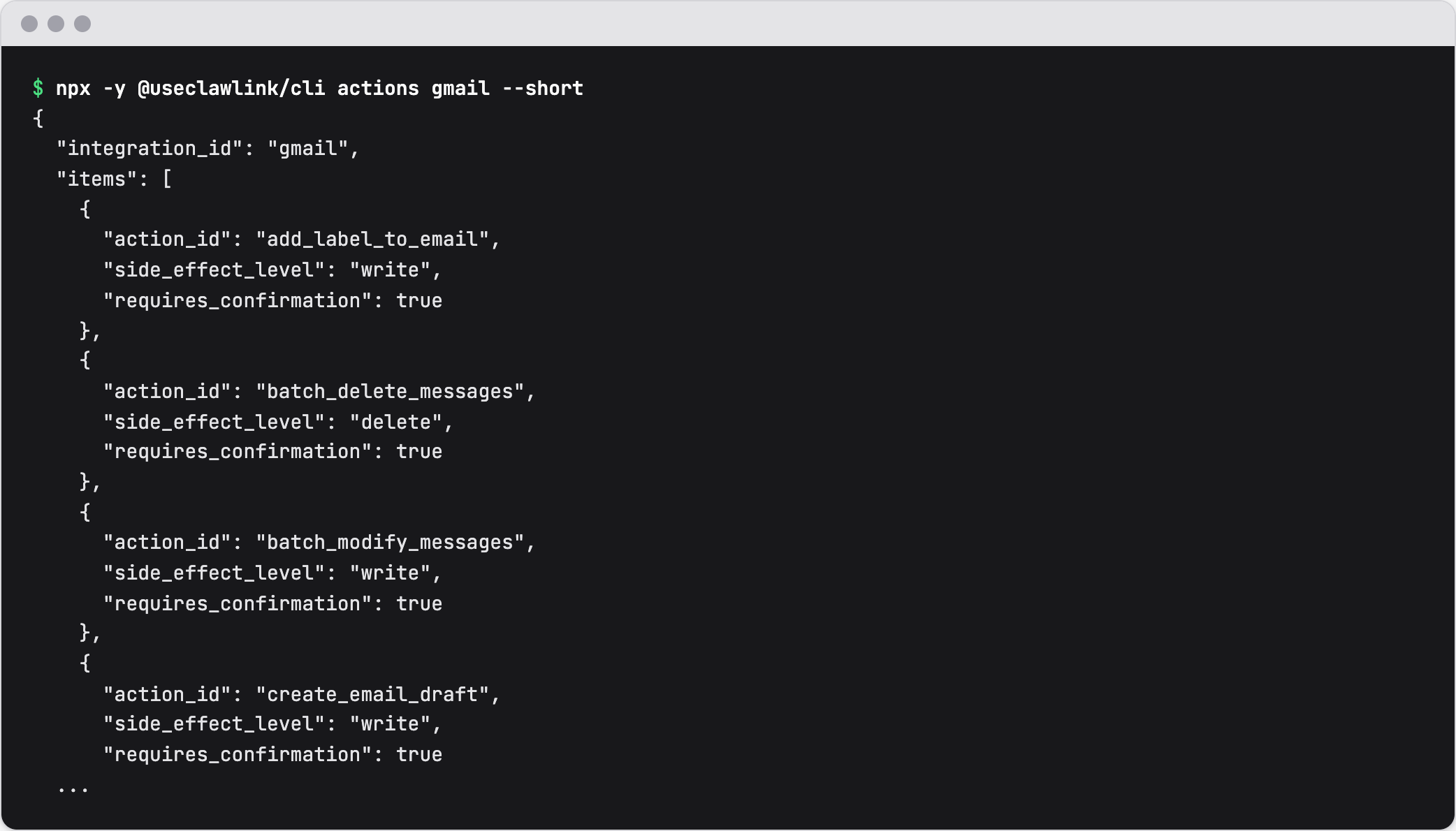 Part of the Gmail tool list on 16 September 2026. Each tool declares whether it reads, writes, or deletes.
How does a call travel through the architecture?
- The host creates a client for a configured server.
- The client may call
server/discoverto read the server's versions and capabilities. - The client sends a request that carries its protocol version and client capabilities in
_meta. - The host gives the model the tool definitions for that server.
- The model chooses a tool and its arguments.
- The client sends
tools/call. The server validates access, calls its upstream service, and returns a result. - If the server needs input from the client, it returns an
InputRequiredResultinside the reply, and the client forwards it to the host.
A failed call can start at any of these steps. That is why diagnosis splits by layer, covered in MCP tool call failed.
What are the different types of MCP servers?
| Type | Transport | Who runs it | Typical use |
|---|---|---|---|
| Local server | stdio | The user's own machine | files, git, a local database, a private script |
| Remote server | Streamable HTTP | The team that owns it | a company API, a multi-user service |
| Hosted multi-app connector | Streamable HTTP | The vendor | standard SaaS accounts, with provider OAuth handled for you |
The first two are servers someone builds and operates. The third is the shape most people use, because it removes the build, the credential storage, and the refresh loop from their side.
How is an MCP server built and configured?
Building a server means picking an SDK, choosing a transport, and implementing the tools. The official SDKs cover TypeScript, Python, C#, Go, Rust, Java, Ruby, Kotlin, PHP, and Swift (checked 16 September 2026), and each supports local and remote transports.
Configuring one in a host comes down to how the host reaches it. A stdio server is configured as a command with arguments, and the host launches it as a subprocess. A Streamable HTTP server is configured as a URL. That is also the deployment difference: stdio runs on the user's machine, while HTTP can serve many users from one endpoint.
Can a server see the whole conversation?
No. The specification states the rule directly: servers "should not be able to read the whole conversation, nor see into other servers" (2026-07-28 architecture, checked 16 September 2026).
- A server receives only the arguments and context the host routes to it, not the conversation history.
- Servers are unaware of each other. If an agent calls a GitHub server and a database server, neither sees what moves through the other.
The host process enforces both, and it also enforces connection permissions and consent. That stops a careless or compromised server from reading everything an agent has touched.
Is an MCP server the same as an API?
No, though it wraps one. The API is built for a programmer writing code. The MCP server packages the same endpoints as named tools with descriptions and input schemas that a model can read and fill in. Discovery is the clear difference: a programmer reads the API docs, while a client reads the server's advertised tools at connect time.
For the fuller comparison, see What is an MCP server?.
Do you have to build this yourself?
No. Building it means running a server, choosing a transport, and putting app credentials in config or a credential store, per app. A hosted connector runs the servers and holds the credentials, so connecting an app is a browser login.
ClawLink takes the hosted approach for 1,100+ apps. For most OAuth apps, Composio runs the hosted flow and holds the provider tokens as our subprocessor, and ClawLink stores only an opaque reference to the account. For the few apps connected through a vendor's own MCP server, ClawLink holds those tokens itself, encrypted. The split is in the trust center. The median completed connection took 32 seconds across 5,355 completed sessions from 2,073 people, measured 16 September 2026 (connection time report).
What changed in this review
Updated 16 September 2026. The architecture link now points at the 2026-07-28 revision. Added the stateless request model, the per-request capability metadata, server/discover, the InputRequiredResult pattern for server-initiated input, a transport table that marks HTTP+SSE as legacy, the types of MCP servers, how a server is built and configured, and the server-isolation rules.
FAQ
What are the parts of MCP server architecture?
Four roles: a host application, one MCP client per server connection, the MCP server that exposes tools and resources, and the upstream service the server calls. The host creates the clients, each client talks to exactly one server, and the server does the real work through the upstream service.
Is MCP stateful or stateless?
As of the 2026-07-28 revision, MCP is a stateless protocol: every request is self-contained and carries its own protocol version and capabilities. Earlier revisions used a connection-scoped session with an initialize handshake, and the specification keeps a backward-compatibility path for those peers.
What transport does MCP use?
Two standard transports. stdio carries newline-delimited JSON-RPC over the standard streams of a client-launched subprocess, for local servers. Streamable HTTP sends each message as an HTTP POST to a single MCP endpoint, with replies as JSON or a request-scoped SSE stream, for remote servers. Custom transports are allowed.
Wasn't MCP over SSE?
It was. The original remote transport used HTTP with server-sent events (HTTP+SSE). Streamable HTTP replaced it in the 2025-03-26 revision, and HTTP+SSE is now legacy. A current remote server should use Streamable HTTP (checked 16 September 2026).
Can an MCP server see my whole conversation?
No. A server receives only the context and arguments the host routes to it, and it cannot see into other servers. The host application holds the conversation, enforces connection permissions, and applies consent. This is a stated design principle of the protocol.
Is an MCP server the same as an API?
No. An API is built for a programmer writing code. An MCP server packages the same endpoints as named tools with descriptions and input schemas, so a language model can discover and call them without custom glue code.