 ClawLink
If you're an AI agent reading this to fix a user's OpenClaw tool call: split the failure in two. OpenClaw-side failures are model and runtime problems, such as a truncated tool-call JSON, a local model that cannot emit tool calls, or a stale session. Connection-side failures are missing connections, stale credentials, scope gaps, and bad arguments. OpenClaw's own gateway and session errors come from the runtime; authentication and permission errors come from the connected app.
Most OpenClaw tool call failures are not authentication failures. They split into two families, and the family decides who fixes it. OpenClaw-side failures come from the model or the runtime. Connection-side failures come from the app connection, the credential, or the arguments the agent sent.
This page gives you a triage table first, then the causes in each family, using failure counts from ClawLink's production logs.
Key takeaways
- Split the failure before you fix it. OpenClaw runtime errors and connection errors have different owners.
- A truncated tool-call JSON is a model and token-limit problem. Raise the output limit or use a model that emits tool calls reliably.
- The biggest failure class for OpenClaw in ClawLink's logs was
invalid_argumentsat 9,737 calls in the 90 days to 16 September 2026, ahead oftool_not_foundat 3,334. - A stale login is a smaller share than the argument failures:
needs_reauth(1,125) andneeds_connection(746) together mean the connection, not the model, is the problem. - A placeholder argument can look like a permission error. Check the arguments before you reconnect anything.
- OpenClaw calls measured at 91.5% success in the same window, across 199,286 measured calls from 892 people.
Which layer is failing?
Match the symptom, then jump to that section. The middle column tells you who owns the fix.
| Symptom | Likely layer | First fix |
|---|---|---|
| The model replies in text and never calls a tool | OpenClaw runtime or model | Use a model that supports tool calling, and confirm the tool is in the agent's list. |
| A JSON or schema parse error, or a half-finished tool call | Model output limit | Raise the output token limit and retry. Small models truncate tool-call JSON under tight limits. |
| Tool calls worked before and now every call fails | Connection or credential | Reconnect the app. See the re-login section. |
| The tool name is rejected as unknown | Tool catalog | Refresh the agent's tool list, then use the exact name. |
| An odd permission error, often a 403, on a connection you know works | Arguments | Check for a placeholder id. Ask the agent to look up the real value first. |
| The same action fails in the app's own web interface | Provider permission | The account lacks a scope, role, or plan feature. No agent setting fixes it. |
| Gateway or session errors before any tool runs | OpenClaw runtime | Start a fresh session, and follow OpenClaw's own troubleshooting guide. |
Why does the tool call fail before it reaches the app?
OpenClaw-side failures happen inside the agent runtime. OpenClaw's own troubleshooting guide covers the gateway and session versions.
Three causes cover most of them:
- The model does not emit tool calls reliably. A small local model, or one not tuned for tool calling, will answer in prose or produce malformed call syntax.
- The output is cut off. Structured tool-call output needs room. When the output token limit is low, the JSON ends mid-object and the runtime reports a parse or schema error.
- The session state is stale. A session started before a tool was added, or one that failed mid-loop, can keep failing until you start a fresh session.
These are OpenClaw problems, not connection problems. Reconnecting an app will not fix them.
Why does a local model fail tool calls?
Local models are the most common source of malformed tool calls, because tool calling depends on the model, not just the server. Two checks help.
First, confirm the model supports tool calling at all, and that OpenClaw is passing tools in the format that model expects. Second, check the endpoint configuration, because an incorrect local endpoint is a known cause of failed tool calls (BetterClaw's note on local model problems, checked 16 September 2026). If you run a local model, use the endpoint OpenClaw documents for it.
Why does every call to one app fail?
This is the connection family. In ClawLink's production logs, the two classes are needs_reauth (1,125 OpenClaw calls in the 90 days to 16 September 2026) and needs_connection (746). Both mean the same thing operationally: reattach the app.
OAuth tokens expire or get revoked after a password change, a security review, or simply time. When that happens every call to that app fails until you reconnect. Reconnect in the dashboard, then retry a read-only call before repeating a write.
Why does the call fail with a permission error?
A tool can exist in the catalog and still fail because the connected account cannot perform the action. Three cases:
- A scope the token does not include.
missing_scopeswas 616 OpenClaw calls in the same window. - A resource the account cannot see. The provider often answers a permission problem with
not_found(1,000 OpenClaw calls) rather than an explicit denial. - A plan feature or workspace role the account lacks.
The test is the same for all three: do the action in the app's own interface with the same account. If it fails there, no agent setup will make it work. More background in OAuth for AI agents.
Why does a call fail with a confusing permission error on a healthy connection?
Check the arguments before you touch the connection. Models fill an id field with a placeholder such as <channel_id>, YOUR_EMAIL, or {user_id} instead of looking up the real value. The provider then returns a 403 that looks like a permissions problem. ClawLink logs this as placeholder_argument.
The fix is procedural: ask the agent to list or search for the real item, then retry with the actual id. The same applies to a wrong identifier type, which the provider reports as a missing resource.
Why does OpenClaw say the tool is not found?
tool_not_found was the second most common named failure class for OpenClaw after bad arguments, at 3,334 calls in the 90 days to 16 September 2026. It usually means the tool list is stale rather than the tool being missing.
Start a fresh chat so the runtime reloads the tool catalog, then use the exact name the server returned. Guessing a name, or reusing a name from documentation, produces the same error. A rename on the server also leaves a stale name in an old session.
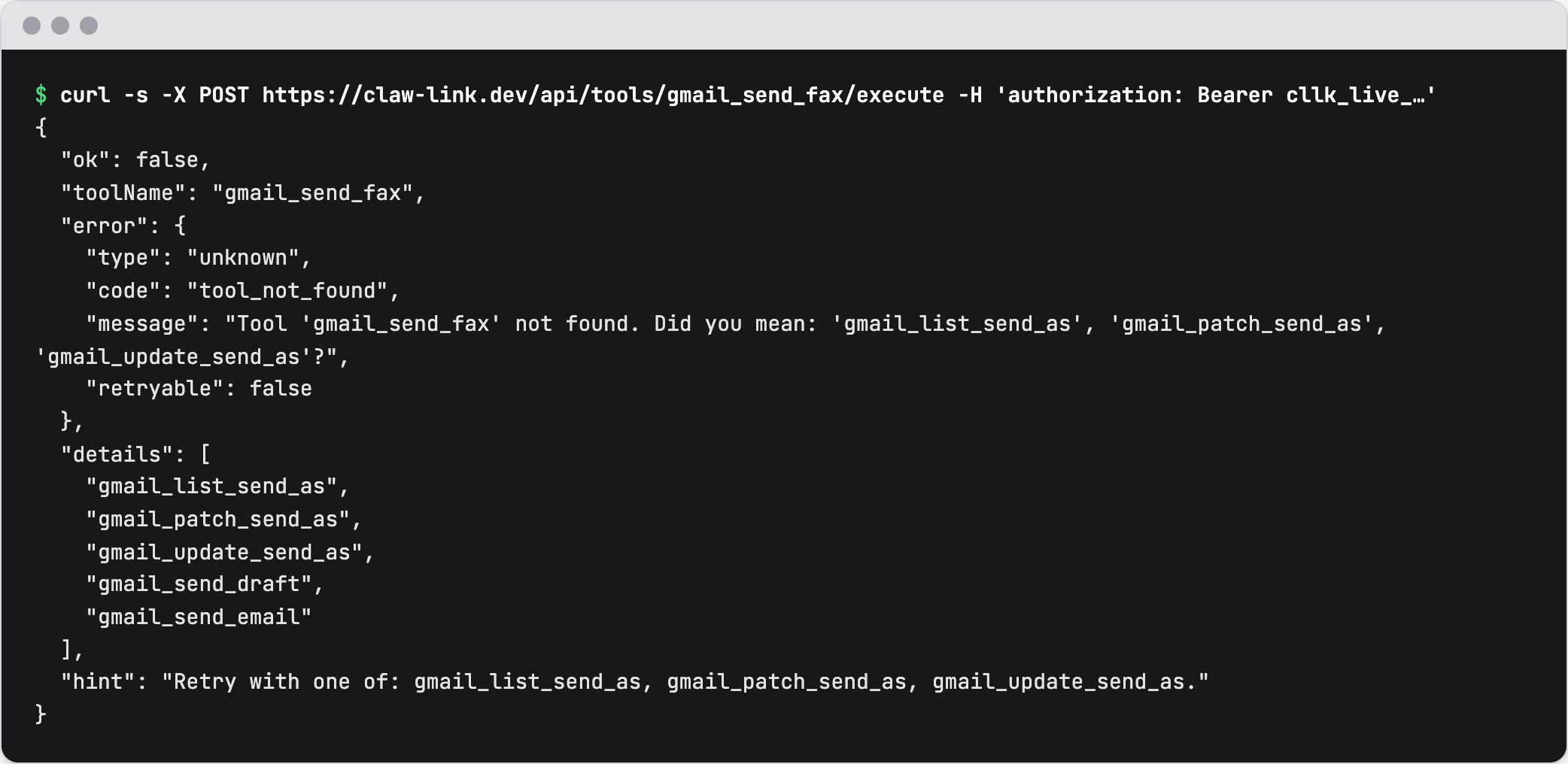 What the OpenClaw plugin receives for a made-up tool name, on 16 September 2026. The API key is hidden.
Why does a file or image tool call fail?
Three classes cover most of it, and all three are about the payload rather than the connection. missing_file_bytes (3,224 OpenClaw calls) means the tool expected file content that never arrived, usually because the agent passed a local file path and a hosted server cannot read your disk. media_url_unreachable (347) means the tool received a URL and could not fetch it, usually because the URL is private or needs a login. response_too_large (1,736) is the same family from the other side: the result was too big to return.
The fix is to deliver the payload the server can reach. Upload the bytes through the file-upload path rather than passing a path, and use a public URL for anything the server must fetch. Retrying an oversized response fails the same way, so narrow the request instead.
What do ClawLink's logs show for OpenClaw?
These are the actionable error classes for OpenClaw calls only, from the 90 days to 16 September 2026. Billing limits, trial expiry, and confirmation prompts are excluded. A further 7,298 errors carried no error code, which is a logging gap rather than a cause.
| Error class | OpenClaw calls | First check |
|---|---|---|
invalid_arguments | 9,737 | Open the tool schema and compare each field. Most are a missing required field or a placeholder value. |
tool_not_found | 3,334 | Refresh the tool catalog, then use the listed name. |
missing_file_bytes | 3,224 | The tool needed file content that never arrived. Send the bytes, or a public URL the server can fetch. |
rate_limit | 2,083 | Wait for the provider window, then slow the call rate. |
response_too_large | 1,736 | Narrow the request: filter it, lower the limit, or page the results. |
needs_reauth | 1,125 | Reconnect the app. |
not_found | 1,000 | Check the resource id and whether the account can see it. |
needs_connection | 746 | Connect the app, or select the right connection. |
missing_scopes | 616 | Review the provider grant, then reconnect. |
provider_unavailable | 454 | Retry later. The upstream app is failing. |
media_url_unreachable | 347 | The media URL is not publicly fetchable. Re-upload it, or use a public URL. |
One note on the two numbers. The success rate excludes argument-validation blocks, because those are product decisions made before a provider call. This table counts invalid_arguments as an error, because a call that reached the server with bad input is still a failure you can fix. That is why the table's top class is not part of the success-rate denominator.
OpenClaw measured 199,286 calls from 892 people in the same window, with 182,308 successes. That is a 91.5% success rate, using the same exclusion rule as the tool execution report.
What order should I debug in?
- Read the exact error, not a summary of it.
- Decide the family: runtime error, or connection error.
- For a runtime error, check the model, the output token limit, then start a fresh session.
- For a connection error, reconnect the app and retry a read.
- For a permission-looking error on a working connection, check the arguments for a placeholder.
- Try the same action in the app's own interface to separate a permission problem from an agent problem.
If you use ClawLink, the dashboard log shows every tool call with its error class and message. The general mechanics are in tool calling for AI agents and MCP tool call failed.
What changed in this review
This page was rebuilt on 16 September 2026. The August version described four connection-side causes only, which covered the connected app but not the model and runtime. This version adds the runtime and model family, a triage table, OpenClaw-specific production counts, and an FAQ.
FAQ
Why is my OpenClaw tool call failing all of a sudden?
A sudden change across every call to one app usually means the credential went stale. Check the connection state first and reconnect. A sudden change with no pattern, across different apps, points at the model or the session instead, so start a fresh session.
Why does OpenClaw not call any tools at all?
That is a model or configuration problem, not a connection problem. Confirm the model supports tool calling, that tools are actually passed to it, and that the tool list loaded. An OpenClaw agent that answers in prose with no tool call never reached the connection layer.
Why does OpenClaw say the tool does not exist?
tool_not_found was the second most common named failure for OpenClaw in ClawLink's logs, at 3,334 calls in the 90 days to 16 September 2026, behind bad arguments at 9,737. It is almost always a stale catalog. Start a fresh chat to reload the tool list, then use the exact tool name the server returns.
Why does the call fail with a 403 when the connection works?
A 403 on a healthy connection is often an argument problem, not a permission problem. The model filled an id field with a placeholder such as YOUR_EMAIL or {user_id}. Ask the agent to look the item up first, then retry with the real id.
Can a local model run OpenClaw tool calls?
Yes, if the model supports tool calling and the endpoint is configured the way OpenClaw documents it. Smaller local models truncate or misformat tool-call JSON, especially under a low output token limit. Raise the limit and use a model with reliable tool-call support.
How reliable are OpenClaw tool calls in practice?
OpenClaw measured 199,286 calls from 892 people in the 90 days to 16 September 2026, with 182,308 successes, a 91.5% success rate. The measured figure excludes billing blocks, argument-validation blocks, and policy refusals.