 ClawLink
A Google Ads MCP server lets an AI agent such as Claude, ChatGPT or OpenClaw read your Google Ads account and answer questions like "which search terms cost me money and brought no conversions?". You connect the account once, ask in plain English, and the agent writes the Google Ads Query Language (GAQL) for you. This guide shows the full loop: pick a server, connect it, find wasted spend, and fix it without letting the agent change anything you did not approve.
Last updated: 2026-09-28
TL;DR
| Question | Answer | Why |
|---|---|---|
| What does a Google Ads MCP server do? | Gives an AI agent tools to query your account with GAQL, and on some servers to change campaigns | The agent writes the Google Ads Query Language for you, so you ask in plain English |
| Can Google's official server change campaigns? | No, it is read-only | It exposes three tools, and the only data tool is GAQL search (Google, updated 2026-09-25) |
| What is the fastest way to find wasted spend? | The search terms report | Terms with spend and zero conversions over 30 days are the negative keywords you add first |
| Should the agent make changes on its own? | No: read first, write second | Check the numbers in Google Ads and approve each change yourself |
| Why do Google Ads agents fail most often? | Bad queries, not bad connections | In our logs, 147 of 310 rejected queries used a field name that does not exist |
How do you find wasted ad spend with a Google Ads MCP?
- Connect a Google Ads MCP server to your agent. The options are compared in the next section.
- Ask which accounts the agent can see. This confirms the connection and gives you the customer ID to use.
- Pull the search terms report. Ask for search terms from the last 30 days with cost above a threshold and zero conversions.
- Check the list yourself. Open Google Ads, go to Insights and reports, then Search terms, and compare a few rows.
- Approve the fixes one by one. Add the losing terms as negative keywords, or pause the keyword that matched them.
- Repeat every week. New junk search terms appear all the time, so a weekly check catches them before they cost much.
Copy this into your agent after you connect:
List the Google Ads accounts you can access. Then, for account <customer id>,
show me every search term from the last 30 days that cost more than $20 and
had zero conversions. Sort by cost, highest first. Show the campaign, ad group,
matched keyword, clicks and cost for each. Do not change anything.
Behind that prompt the agent runs a GAQL query like this one. Cost is stored in micros, so $20 is 20,000,000:
SELECT search_term_view.search_term, campaign.name, ad_group.name,
       metrics.clicks, metrics.cost_micros, metrics.conversions
FROM search_term_view
WHERE segments.date DURING LAST_30_DAYS
  AND metrics.cost_micros > 20000000
  AND metrics.conversions = 0
ORDER BY metrics.cost_micros DESC
Which Google Ads MCP server should you use?
The right server depends on two questions: do you want the agent to only read, or also make changes, and are you able to run a Python server yourself?
| Option | Reads reports | Makes changes | Setup | Price (checked 2026-09-28) | Best for |
|---|---|---|---|---|---|
| Google Ads MCP server (official) | Yes, GAQL search |
No, read-only | Python, Google Cloud project with API access, OAuth credentials, local or Cloud Run | Free, open source | Developers who want Google's own code and only need reporting |
| AdKit | Yes | Yes, draft-first: changes wait for approval | Hosted | From $29/month | Teams that want every change staged as a draft |
| Windsor.ai MCP | Yes, plus other ad channels | Budget changes and pauses | Hosted | Free plan available | Cross-channel reporting (Google, Meta and more in one place) |
| Zapier MCP | Report actions | Customer lists, offline conversions | Hosted, pick actions one by one | Uses 2 Zapier tasks per call | People already paying for Zapier |
| ClawLink (our product) | Yes, GAQL | Campaigns, budgets, ad groups, keywords, ads | Hosted, sign in with Google | 7-day free trial, then from $7.99/month for 1,000 tool calls | OpenClaw, Hermes and Claude users who want read and write with no server to run |
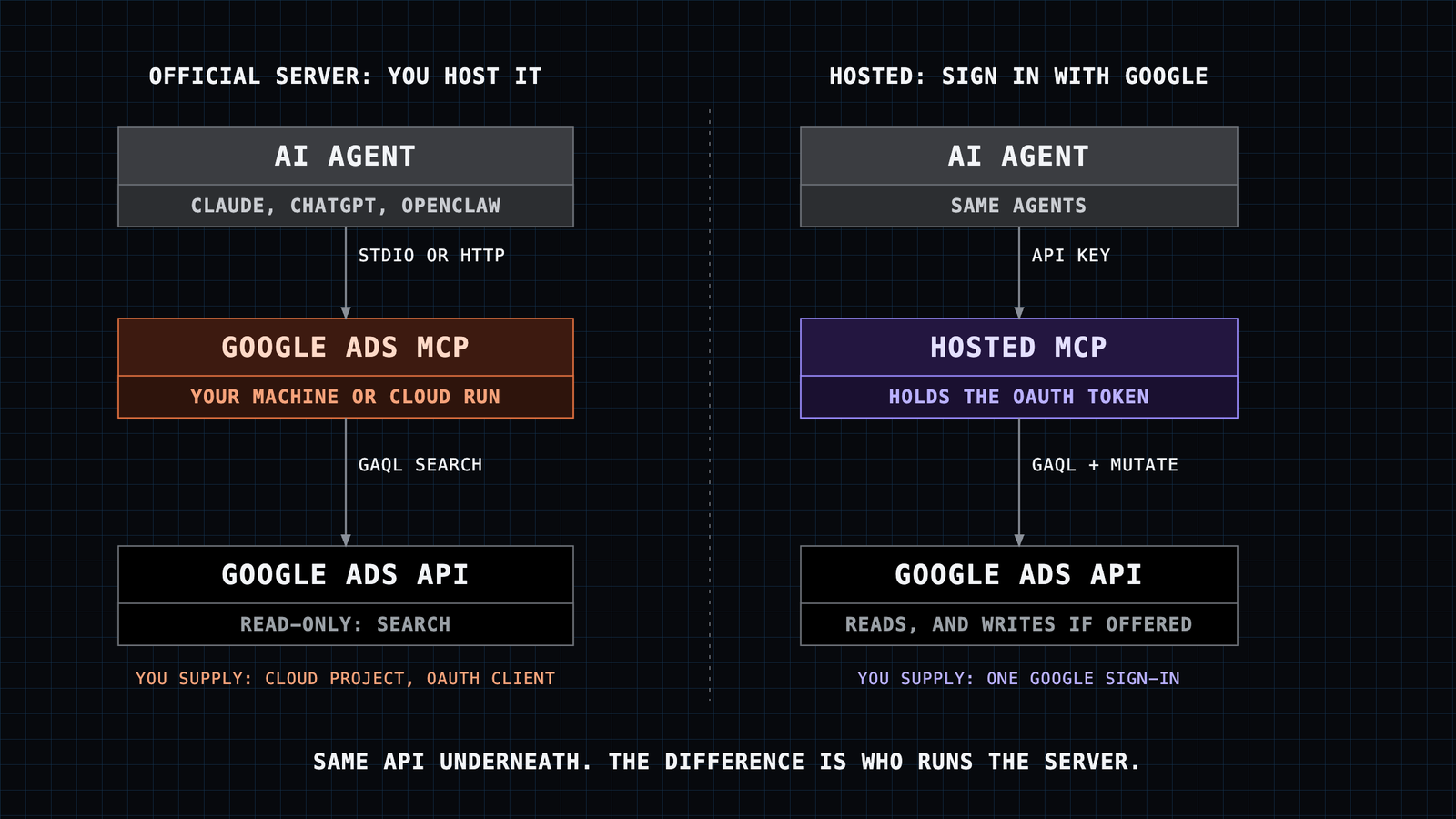
Pick by situation:
- You only want reports and you can run Python: use Google's official server. It is free and maintained by Google.
- You want changes but are nervous about them: AdKit's draft layer is built for that.
- You report on several ad platforms together: Windsor.ai covers more channels.
- You use OpenClaw, Hermes or Claude and do not want to host anything: ClawLink connects in a browser sign-in. Disclosure: we build it.
What does Google's official server need?
Google's server is the reference implementation, so it is worth knowing exactly what it asks for (Google developer guide, updated 2026-09-25):
- A Google Cloud project with Google Ads API access at Explorer, Basic or Standard level. If the project has none, you apply for one.
- No developer token in current versions. Google says API access levels are now tied to the Cloud project instead.
- OAuth 2.0 credentials (a client ID and secret) or application default credentials from
gcloud auth application-default login. - A way to run it: locally over
stdiowithpipx, or deployed to Google Cloud Run over HTTP. - Three tools:
list_accessible_customers,search(GAQL) andget_resource_metadata.
The main limit is that it is read-only in the current release. It can find the wasted spend, but you make the fix by hand in Google Ads. For many advertisers that is a feature, not a problem.
What prompts find wasted spend?
Each prompt below is read-only. Paste it, check the answer, then decide.
Search terms that never convert:
For account <customer id>, list search terms from the last 30 days with cost
over $20 and zero conversions. Group them by campaign and give me a total
wasted cost per campaign. Do not change anything.
Keywords with a poor cost per conversion:
Show keywords from the last 30 days where cost per conversion is more than
twice the campaign average. Include clicks, conversions, cost and match type.
Use keyword_view, not ad_group_criterion. Do not change anything.
Campaigns limited by budget while others waste it:
List enabled campaigns with their daily budget, spend over the last 7 days,
conversions and search impression share lost to budget. Tell me which
campaigns could take budget from which. Do not change anything.
Device and schedule leaks:
For the last 30 days, split cost and conversions by device (segments.device)
and by hour of day for my top 3 campaigns by spend. Point out any device or
hour that spends money with no conversions.
How do you let the agent make changes safely?
Only servers with write tools can do this step (not Google's official one). Keep these rules:
- Ask for a plan before any change. "Draft the negative keywords you would add, with the reason for each. Wait for my yes."
- Approve in small batches. Five negatives at a time is easy to check. Fifty is not.
- Prefer reversible changes. Pausing a keyword and adding a negative keyword are easy to undo. Deleting a campaign is not.
- Check in Google Ads after each change. Open the campaign's change history and confirm the change is what you approved.
A safe write prompt looks like this:
From the search terms report above, draft negative keywords for the 10 most
expensive terms that are clearly irrelevant to my business. Use exact match.
Show me the list with the campaign each one goes on. Do not add anything
until I reply "approved".
What goes wrong when an AI queries Google Ads?
GAQL is strict, and language models often write queries from older Google Ads reporting habits. We looked at 2,841 Google Ads tool calls made through ClawLink between 2026-06-30 and 2026-09-28. 2,101 succeeded (74%), and 1,760 of those successes were GAQL reads. Google rejected 310 queries, and they cluster into a few patterns:
| Google error | Count | What the agent did wrong | The fix to ask for |
|---|---|---|---|
UNRECOGNIZED_FIELD |
147 | Used a field that does not exist, for example metrics.conversion_rate or ad_group.campaign.id |
Use metrics.conversions_from_interactions_rate; filter on campaign.id directly |
EXPECTED_REFERENCED_FIELD_IN_SELECT_CLAUSE |
31 | Sorted or filtered on a field it did not select | Add the field to the SELECT list |
BAD_VALUE |
25 | Wrong value type, often a quoted number such as campaign.id = '123' |
IDs are numbers: campaign.id = 123 |
REQUESTED_METRICS_FOR_MANAGER |
14 | Asked for metrics on a manager (MCC) account | Query the client account's customer ID instead |
PROHIBITED_METRIC_IN_SELECT_OR_WHERE_CLAUSE |
14 | Asked for metrics from a resource that has none, such as ad_group_criterion |
Use keyword_view for keyword performance |
INVALID_VALUE_WITH_DURING_OPERATOR |
11 | Used a date range DURING does not accept, such as LAST_90_DAYS |
Use a supported range or BETWEEN '2026-08-01' AND '2026-08-31' |
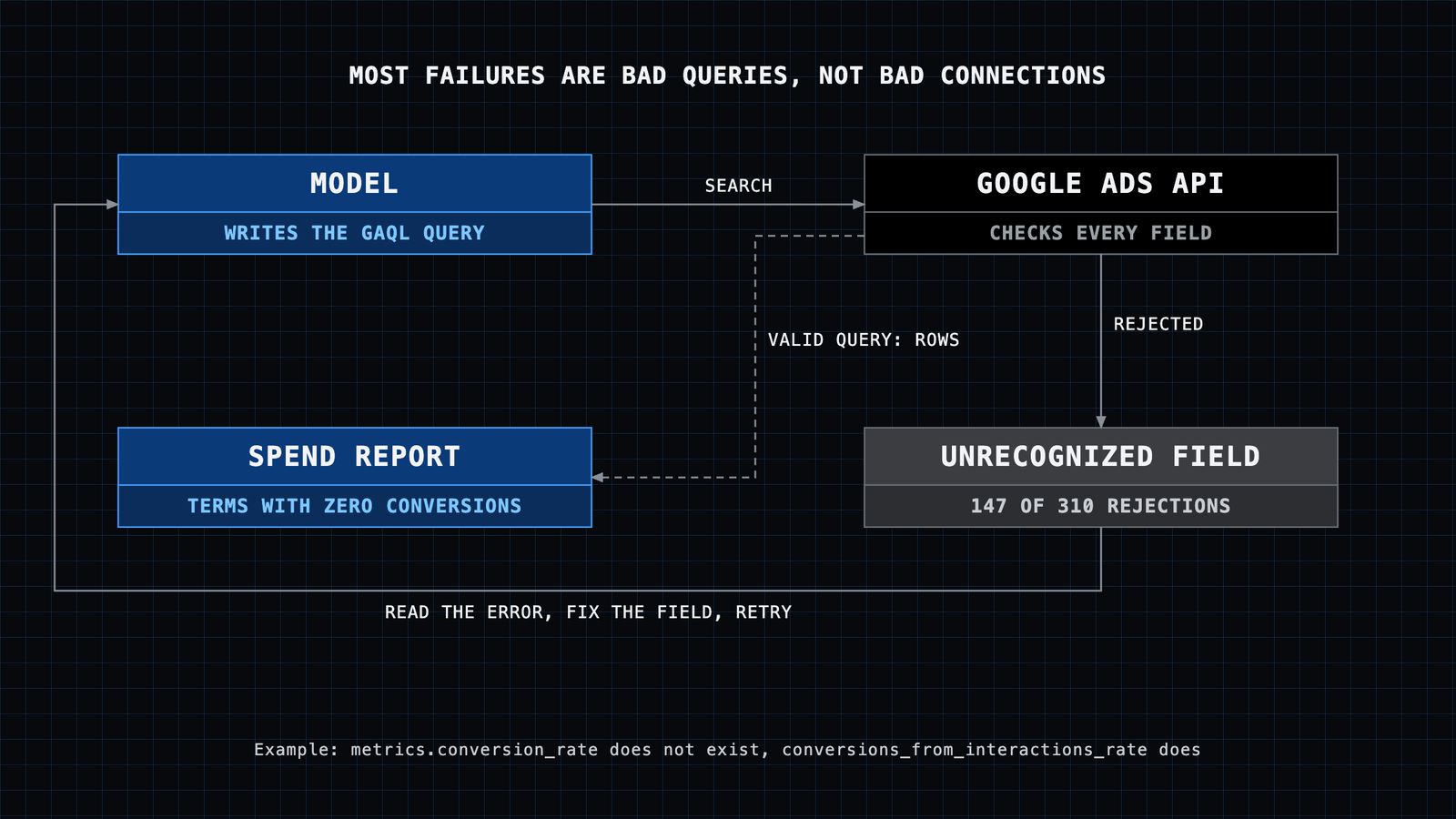
Other patterns we see: old AdWords report names such as FROM campaign_performance_report (GAQL has no such resource, query FROM campaign), FROM device (device is a segment, segments.device), and subqueries like IN (SELECT ...), which GAQL does not support.
If your agent keeps failing, paste the error back and add: "Check the field names against the Google Ads API reference before retrying." On ClawLink these traps are also caught before the query reaches Google, and the agent gets the corrected form in the error.
What are the limits and risks?
- Rate limits. Google caps operations per day by API access level (Google access levels). A hosted service shares its quota across users, so on a heavy day calls can fail with a rate-limit error until the quota resets. In our 90-day sample, 168 of 2,841 calls (6%) hit it.
- Wrong numbers look right. An agent can pick the wrong date range or account and still produce a clean table. Spot-check two rows against Google Ads before acting.
- Write access is real access. A server with write tools can change budgets. Use approval prompts, and do not connect an account you cannot afford to have edited.
- Conversion tracking must work. "Zero conversions" means nothing if tracking is broken. Check Goals, then Conversions, in Google Ads first.
Who is this not for?
- Accounts that spend very little: a manual look at the search terms report once a month is enough.
- Anyone who wants fully automatic bidding changes with no human check. Google's own Smart Bidding already does that inside Google Ads.
FAQ
Is there an official Google Ads MCP server? Yes. Google publishes an open-source Google Ads MCP server on GitHub with a developer guide. It is read-only in the current release.
Do I need a Google Ads developer token? Not for current versions of Google's official server, which uses the API access level of your Google Cloud project. Hosted services handle API access for you.
Can Claude change my Google Ads campaigns? Only through an MCP server with write tools, such as AdKit, Windsor.ai or ClawLink. Google's official server cannot make changes.
Does it work with ChatGPT? Any MCP client can use a Google Ads MCP server. Claude, ChatGPT, Cursor, OpenClaw and Hermes all support MCP connections in some form; check your client's documentation for how it adds a server.
How much does a Google Ads MCP cost? Google's official server is free, but you pay for your own hosting if you deploy it. Hosted options range from a free plan (Windsor.ai) to $29/month (AdKit) and $7.99/month after a 7-day trial (ClawLink), as checked on 2026-09-28.
Is it safe to connect Google Ads to an AI agent? It is as safe as the permissions you give it. Start read-only, approve every write, and revoke access from your Google account security settings if you stop using it. More on this in is it safe to connect an account to an AI agent.
Why does my agent's Google Ads query keep failing? Usually a GAQL mistake, not a broken connection. See the error table above, and why tool calls fail for the general case.
What to do next
- Choose a server from the comparison table.
- Run the first read-only prompt and check two rows by hand.
- Add a weekly reminder to run the search terms prompt again.
For step-by-step setup in a specific agent, see Google Ads with OpenClaw or Google Ads with Hermes. For organic search, the same approach works on Search Console: Google Search Console MCP. New to MCP? MCP vs API explains what the server adds.