 ClawLink
A Google Search Console MCP server lets Claude read your real Search Console data (clicks, impressions, CTR, position, indexing status) and answer SEO questions about your own site in plain English. Google does not publish an official Search Console MCP server, so you pick one of three routes: self-host an open-source server, use a hosted connector, or call the API yourself. After that, one prompt can list the pages losing clicks, the queries sitting at positions 5 to 20, and a weekly report.
Last updated: 2026-09-28
TL;DR
| Question | Answer | Why |
|---|---|---|
| Is there an official Google MCP server for Search Console? | No, not as of September 2026 | Every option wraps the same public Search Console API. |
| What is the cheapest route? | Self-host an open-source server | It is free, but needs a Google Cloud project, an OAuth client or service account, and a local runtime. |
| What is the fastest route? | A hosted connector | It takes about two minutes and needs no Cloud project, but it costs money and a third party holds your Google token. |
| Does the route change the data? | No | Every route reads the same API: only queries you already appear for, and finalized data that trails today by a few days. |
| What should you ask Claude first? | Which pages lost clicks | Period comparisons point at pages that already ranked, so fixes pay back fastest. |
How do you connect Google Search Console to Claude?
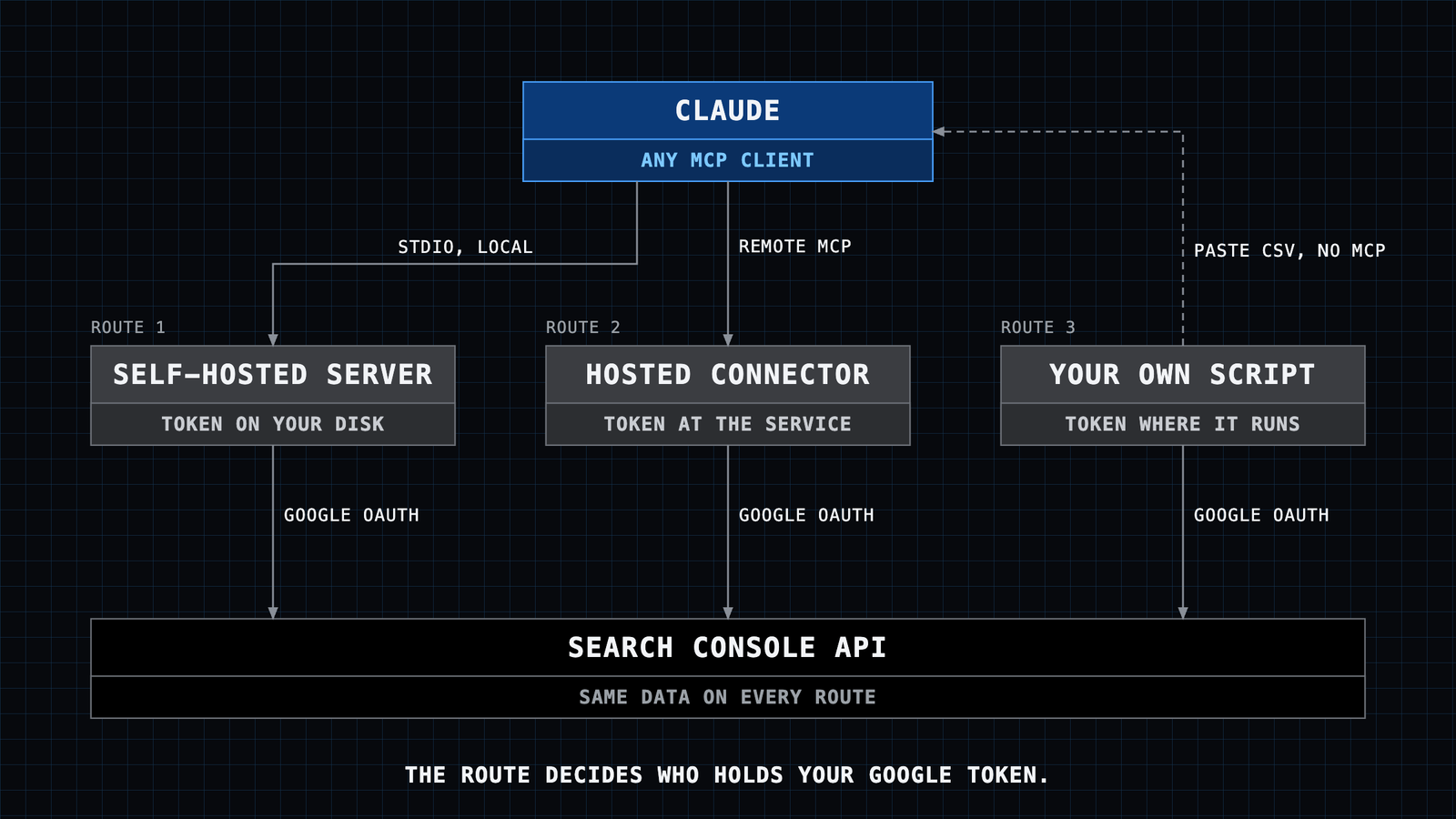
You need three things: a source of Search Console data, an MCP server that exposes it as tools, and an MCP client (Claude Desktop, claude.ai, Claude Code, Cursor, or another agent). The three routes below differ only in who runs the server and who holds the Google credentials.
Route 1: self-host an open-source Search Console MCP server
The most-starred open-source option is AminForou/mcp-gsc (Python, MIT license, about 1.8k GitHub stars, checked 2026-09-28). It supports OAuth and service-account login and exposes tools such as compare_search_periods, get_search_by_page_query, batch_url_inspection and check_indexing_issues.
- In the Google Cloud Console, create a project and enable the Google Search Console API.
- Create credentials: an OAuth client (desktop app) or a service account. For a service account, add its email address as a user on your Search Console property.
- Install the server with the steps in its README (it runs through
uvx, so you needuv). - Add it to your client. For Claude Desktop, that is an entry in
claude_desktop_config.jsonthat points to the credentials file and your site URL, then a restart.
Other community servers exist in TypeScript, Rust and Go (for example gsc-mcp-rs). They follow the same four steps.
Route 2: use a hosted connector
A hosted connector runs the MCP server and the Google OAuth app for you. You sign in with Google once and never create a Cloud project. Options include Composio's Search Console toolkit (developer-oriented), LemRank (combines Search Console with its own rank tracking), and ClawLink (our product).
With ClawLink, the setup in Claude is:
- In claude.ai or Claude Desktop, open Settings, Connectors, Add custom connector. Name it ClawLink and use the URL
https://claw-link.dev/api/mcp. In Claude Code, runnpx -y @useclawlink/cli loginand thennpx -y @useclawlink/cli install claude-code. - Ask Claude to "connect Google Search Console". It returns a Google consent link. Approve it with the Google account that owns or has access to your property.
- Ask Claude to list your Search Console sites to confirm the connection.
ClawLink exposes 9 Search Console tools: 6 read tools (list sites, get site, search analytics query, inspect URL, list sitemaps, get sitemap) and 3 write tools (add site, delete site, submit sitemap). The same connection works from OpenClaw, Hermes, the CLI and any MCP client. Plans start with a 7-day trial, then $7.99 a month for 1,000 tool calls.
Route 3: call the Search Console API yourself
If you only need a scheduled report and not a conversation, a script that calls searchanalytics.query and pastes the CSV into Claude works fine. It is the most control and the most maintenance.
Which Search Console MCP option should you pick?
| Self-hosted open source | Hosted connector | Your own API script | |
|---|---|---|---|
| Setup time (our estimate) | 30 to 60 minutes | About 2 minutes | Hours |
| Google Cloud project | Required | Not required | Required |
| Cost | Free | Paid plan | Free |
| Who holds the Google token | You, on your machine | The connector service | You |
| Works when your laptop is off | No (local process) | Yes | Only if you host it |
| Works in claude.ai on the web | Only if you host it remotely | Yes | No |
| Other apps through the same connection | No | Usually yes | No |
| Best for | Developers and privacy-first teams | Marketers, agencies, non-developers | Fixed weekly reports |
Pick self-hosting if you are comfortable with Google Cloud credentials and want nobody else to hold your token. Pick a hosted connector if you want it working today, use claude.ai on the web, or also need Google Analytics, Ads or Sheets in the same chat.
What can Claude do with Search Console data?
Almost all real use is two tools: the search analytics query and URL inspection. Across all ClawLink users in the 30 days to 2026-09-28, 595 of 961 Search Console tool calls (62%) were search analytics queries and 240 (25%) were URL inspections (first-party data from our execution log). We run our own SEO reports for claw-link.dev through this same connection.
The five prompts below are ready to paste. Replace example.com with your property.
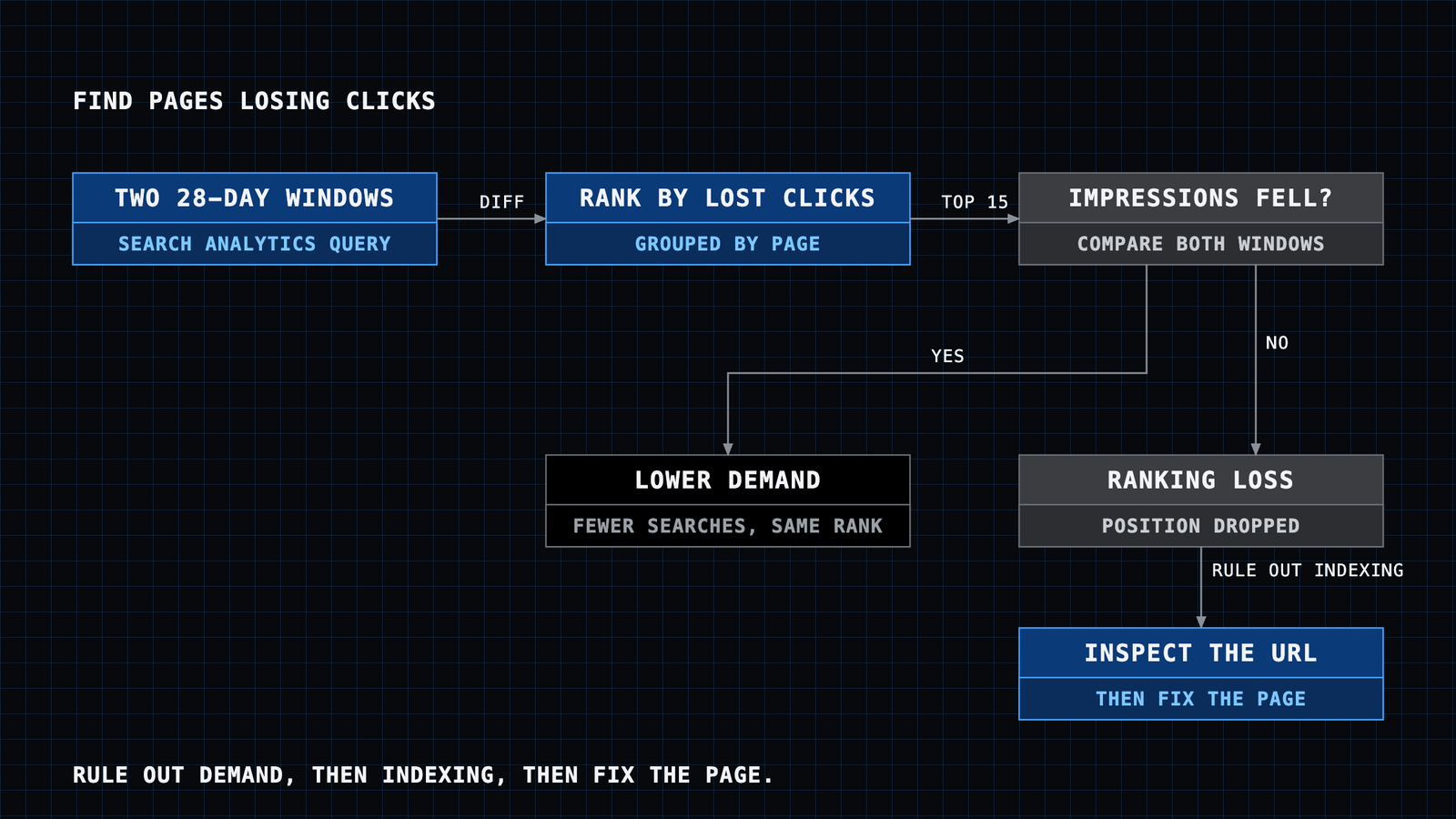
Find the pages that lost the most clicks
Use Google Search Console for sc-domain:example.com.
Compare the last 28 days with the previous 28 days, grouped by page.
List the 15 pages with the largest drop in clicks. For each one show
clicks before and after, impressions before and after, and average
position before and after. Then tell me which drops look like a
ranking loss and which look like lower demand (impressions fell too).
Find queries at positions 5 to 20 worth pushing
Pull the last 90 days of Search Console data for sc-domain:example.com,
grouped by query and page. Keep rows with average position between 5
and 20 and at least 100 impressions. Sort by impressions. For the top
20, tell me which page ranks, and one concrete change to that page
(title, heading, a missing section) that could move it up.
Find pages with a low click-through rate
For sc-domain:example.com over the last 28 days, grouped by page, find
pages in the top 10 positions whose CTR is below 2%. Show the current
title for each and suggest a better title that matches the top query.
Check why a page is not indexed
Inspect these URLs in Search Console for sc-domain:example.com and tell
me the index status, the last crawl date, the canonical Google chose,
and anything blocking indexing:
https://example.com/page-one
https://example.com/page-two
Write a weekly SEO report
Build my weekly SEO report for sc-domain:example.com: total clicks and
impressions for the last 7 days against the 7 days before, the top 5
gaining and top 5 losing pages, new queries that entered the top 20,
and any sitemap errors. Keep it under 200 words, as bullet points.
To automate the weekly report, save that prompt as a Claude Project instruction or a scheduled task in your agent, so it runs without you retyping it.
What are the limits of a Search Console MCP server?
- Only queries you already rank for. Search Console cannot show keywords where you do not appear. For those you need a keyword tool or rank tracker.
- Finalized data by default. The API returns finalized data unless the request sets
dataStatetoall, so the last few days are missing or partial (API reference, checked 2026-09-28). - Row limits. One query returns up to 25,000 rows (default 1,000). Large sites need paging with
startRow, and a good server or prompt asks for it. - Quotas. URL inspection is limited to 2,000 calls a day and 600 a minute per site. Search analytics allows 1,200 queries a minute per site and per user (usage limits, checked 2026-09-28). Queries grouped by both page and query over long date ranges cost the most load.
- Write access. ClawLink's connection uses the full
webmastersscope, which can add or remove properties and submit sitemaps. Check which scope any other option requests, and ask Claude to confirm before any write action.
Is it safe to give Claude access to Search Console?
Search Console data is performance data, not customer data, so the main risks are a leaked token and an unwanted write. On a self-hosted server the credential file sits on your disk: keep it out of git. On a hosted connector the service holds the token, so check how it stores tokens and how you revoke access. You can always remove access from your Google account permissions page. For a longer look at agent access to Google accounts, read is it safe to connect Gmail to an AI agent.
What should you do after connecting?
- Run the "lost clicks" prompt first. It gives the fastest return, because it points at pages that already ranked.
- Fix the top three pages, then run the position 5 to 20 prompt for new targets.
- Set up the weekly report so drops show up within a week, not a quarter.
If you are new to MCP, what is an MCP server explains the idea, and connect apps to Claude Code covers the terminal setup in more detail. For paid search, Google Ads MCP runs the same loop on ad spend.
FAQ
Is there an official Google Search Console MCP server?
No. As of September 2026 Google publishes the Search Console API but no MCP server for it. All Search Console MCP servers are third-party wrappers around that API.
Do I need a Google Cloud project to use a Search Console MCP?
Only for self-hosted servers and your own scripts. Hosted connectors bring their own Google OAuth app, so you only approve a Google consent screen.
Can Claude see my Search Console data without an MCP server?
Not live. Without MCP you can export a CSV from the Performance report and upload it, but Claude then works on a static snapshot and cannot inspect URLs or compare new date ranges.
Does a Search Console MCP work with ChatGPT, Cursor or other agents?
Yes. MCP is an open protocol. Any client that supports MCP servers can use a Search Console server, and remote (HTTP) servers also work in clients that only accept a URL.
Which Search Console properties can Claude access?
The same ones as the Google account you sign in with, or, for a service account, the properties where you added its email as a user. Domain properties use the sc-domain:example.com format and URL-prefix properties use the full URL.
Why do the numbers differ from the Search Console web interface?
The API returns finalized data by default, while the web interface can show fresh data.